Computer Science
Staff
Mr N King CITP FBCS (Head of Department)
Mr M Hawkins (2nd in Department)
Miss C Zetu (Teacher of Computer Science)
Mr C Eaton (Technical Operations Manager)
Mr A Kilcullen (Head of IT Services)
Mr M Hinton (Senior ICT Technician)
Aims
Computer Science and Multimedia (C&M) is part of the core curriculum at Handsworth Grammar School. This means that every child in years 7 to 11 will be taught C&M as a discreet subject.
The Department aims to ensure that every pupil at HGS will leave the school competent and confident in Computer Science & Multimedia technologies and be familiar with a wide range of commonly used applications and peripherals such as interactive whiteboards, projectors, digital cameras, camcorders, scanners, tablets, Raspberry Pi’s, monochrome and colour laser printers.
The Computer Science & Multimedia curriculum that is delivered at HGS, has been designed to enable students to develop skills that can be used throughout the whole of their education with emphasis on particular computing skills including programming, graphic design, animation and web authoring.
Course Calendars
Resources
Departmental resources include five dedicated computer suites consisting of 30 computers in each room. There are a further eight additional computer suites, across other curriculum areas, giving a total provision of around 500 computers throughout the school. Our extensive facilities allow all students to have individual access to a computer when required. The dedicated computer suites incorporate the latest technologies, including CTouch laser 70” interactive screens. This has fully opened the world of touch technology in lessons, enabling increased engagement, involvement and collaboration.

Key Stage 3
In Key Stage 3 our Computer Science and multimedia curriculum has been enhanced to incorporate computing topics aligned to workplace competencies expected by employers.
Year 7
In year 7 pupils have one lesson per week. The students begin with an induction unit to help them become familiar with the ICT facilities in our school. This unit also develops good working practices and emphasises the importance of frequently saving all schoolwork onto their personal cloud drive.
| Year 7 – One lesson per week |
| 7.1 Induction |
| 7.2 Baseline Assessments |
| 7.3 Digital Enterprise Certificated Award |
| 7.4 How Computers Work |
| 7.5 Programming with Python |
| 7.6 Physical Computing |
| 7.7 MS Office |
| 7.8 Turtle Graphics |
| 7.9 Micro:bit Programming |
| 7.10 Teach-ICT Further Python |
| 7.11 Code Combat |
| 7.12 Scratch |
Year 8
In year 8 pupils have two lessons per week. The course operates in a similar manner to year 7, with some new skills being learned and some existing skills being extended to an intermediate / advance level. The units of work are as follows:
| Year 8 – Two lessons per week |
| 8.1 Computer Systems |
| 8.2 Spreadsheets |
| 8.3 Computational Thinking – Oxford University Challenge (Bebras) |
| 8.4 Adobe Animation |
| 8.5 Computer Networks |
| 8.6 Advanced Programming using Python |
| 8.7 Digital Enterprise Award |
| 8.8 HTML |
| 8.9 Cyber Security |
| 8.10 Artificial intelligence |
Year 9
In year 9 pupils have one lesson per week. The course continues in a similar manner to years 7 and 8, with new skills being learned and some being developed further.
| Year 9 – One lesson per week |
| 9.1 Understanding Computers |
| 9.2 Computational Thinking – Oxford University Challenge (Bebras) |
| 9.3 Problem Solving Using Algorithms |
| 9.4 Cyber Security and the Internet |
| 9.5 Expert Databases with BCS |
| 9.6 Advanced Digital Enterprise Award |
| 9.7 Advanced programming. |
Key Stage 4
Year 10 to 11
Computer Science is an option subject in Key Stage 4 and the department currently offers the following qualification at Level 2:
OCR GCSE in Computer Science (J277).
This new OCR GCSE Computer Science course enables students to apply computational thinking in context, across two written examinations. We build students’ ability to think computationally, within the context of a single scenario, and prepare students for real-world computer challenges. Computational thinking is integrated throughout the content to embed this essential approach to the subject.
The skills and knowledge developed through this qualification help students to: understand and apply the fundamental principles and concepts of computer science, including abstraction, decomposition, logic, algorithms, and data representation. Analyse problems in computational terms through practical experience of solving such problems, including designing, writing and debugging programs. Think creatively, innovatively, analytically, logically and critically. Understand the components that make up digital systems, and how they communicate with one another and with other systems. Understand the impacts of digital technology to the individual and to wider society and apply mathematical skills relevant to computer science.
GCSE specifications in Computer Science will be assessed through two written examinations.
The GCSE Computer Science qualification develops ‘underpinning knowledge’ and transferable skills for progression to A levels and higher education. It includes topics that extend students’ understanding and aids progression, for example, the internet and SQL databases.
Key Stage 5
The Computer Science A-Level will extend thinking skills, logic and problem solving as well as learning technical details about computer hardware, diagramming and creating actual program code.
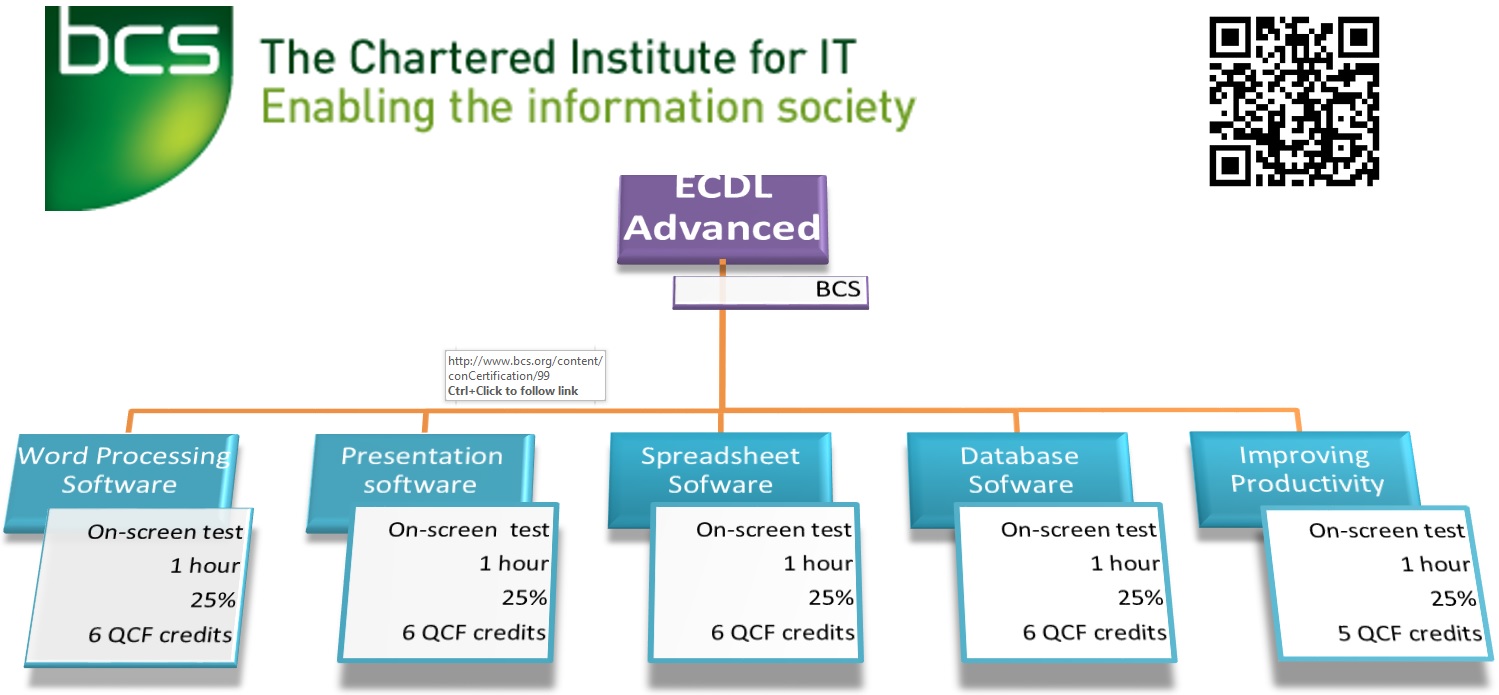
The ECDL Certification and Advanced (level 2 and 3) are offered as part of the Enrichment Programme in year 12. These are modular courses assessed by on-screen practical and theory tests. Upon completion of ECDL Advanced (BCS Certificate in IT User Skills), 24 UCAS points are awarded.
Computer Science A LEVEL
Computer Science A-Level is an ideal introduction for those wanting to pursue a career in Computing / IT as systems analysts, software developers and IT professionals as well as complementing many other careers.
This course is not just about learning to use tools or training in a programming language. Instead, the emphasis is on computational thinking, a kind of reasoning used by both humans and machines. Thinking computationally is an important life skill, which means using abstraction and decomposition. The study of computation is about what can be computed, and how to compute it.

In year 12 there are two units.
Unit 1 is a practical, on-screen, examination which allows candidates to demonstrate their knowledge of the fundamental principles of the subject: Problem Solving; Data Representation, computation and problem solving, using theory style questions and then focusing on programming through a practical, time limited, problem-solving scenario using pre-release material.
Unit 2 focuses on the fundamentals of: Computer Systems; Hardware and Software elements; Machine Level Architecture and the social and Economic consequences of Computing, including the structure of networks and the Internet.
In year 13, there are two further units. It builds on the content of year 12, but in more depth and detail and includes a third part, the NEA.

Unit 1 is a practical, on-screen, examination which allows candidates to demonstrate their knowledge of the fundamental principles of the subject: Problem Solving; Data Representation, computation and problem solving, using theory style questions and then focusing on programming through a practical, time limited, problem-solving scenario using pre-release material.
Unit 2 focuses on the fundamentals of: Computer Systems; Hardware and Software elements; Machine Level Architecture and the social and Economic consequences of Computing, including the structure of networks and the Internet, databases and big data.
The NEA (None Examined Assessment) is an internally assessed practical unit, where candidates are required to complete a report on a computer-based, programmed, solution to a problem solving exercise of their choice, including a relational database solution, Computer-aided learning system, a scientific or mathematical problem or a mobile phone/tablet app.
ICDL / ITQ (International Computer Driving Licence)
What is ICDL?
The International Computer Driving Licence (ICDL) is an internationally recognised series of qualifications for people who need to demonstrate to potential employers their competence in the key concepts of computing, or who simply require a solid foundation of computing skills upon which to build their future IT experience. It can be delivered in school, college, university or in work places. ICDL is the BCS’s brand name for ITQ.